

CLI Installation
The Strata CLI lets you keep your Spaces on disk as Markdown, on macOS and Linux. The simplest install is the download page, which detects your OS; the commands below do the same from the terminal.
Already installed? Browse the full command reference.
Install on macOS
Homebrew
One command. Brew handles the tap, the .pkg, and future updates.
brew install --cask strata-space/tap/strataUpdate later with brew upgrade --cask strata.
Direct .pkg installer
Download the signed universal .pkg and double-click to install. The postinstall script adds strata to /usr/local/bin so it lands on your PATH.
macOS mount permission
Only needed for strata mount on macOS. The recommended strata link sync needs none of this. macOS hides the FSKit toggle behind a slightly non-obvious view:
- Open System Settings.
- Go to General → Login Items and Extensions.
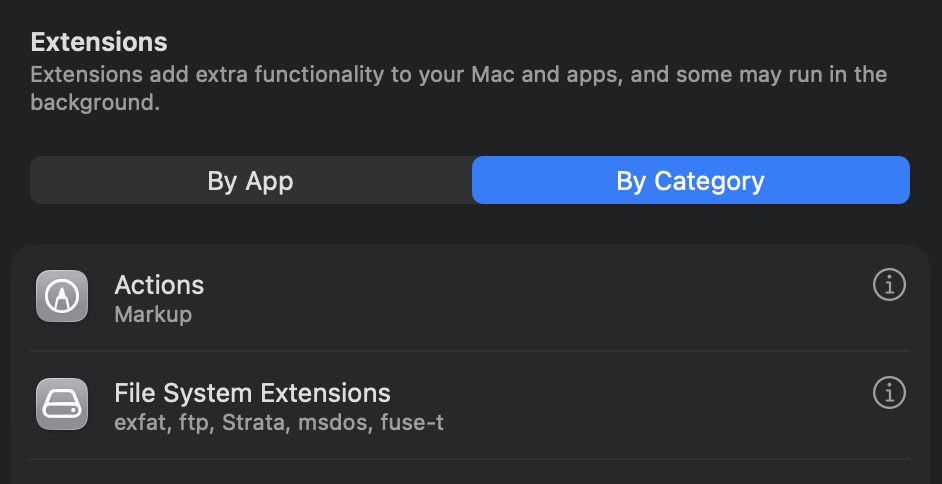
- Scroll to Extensions and click File System Extensions.
- Switch the view from "By App" to By Category. Strata does not appear in the By App list.
- Toggle Strata on under File System Extensions.
Install on Linux
The Linux build is a single binary in a gzipped tarball. Pick the right architecture, extract, and move the binary onto your PATH.
aarch64
curl -L https://github.com/strata-space/strata/releases/latest/download/strata-linux-aarch64.tar.gz | tar -xz
sudo install -Dm755 strata /usr/local/bin/strata
sudo install -Dm644 libstrata_fuse.so /usr/local/lib/strata/libstrata_fuse.so
rm strata libstrata_fuse.so
strata --version
x86_64
curl -L https://github.com/strata-space/strata/releases/latest/download/strata-linux-x86_64.tar.gz | tar -xz
sudo install -Dm755 strata /usr/local/bin/strata
sudo install -Dm644 libstrata_fuse.so /usr/local/lib/strata/libstrata_fuse.so
rm strata libstrata_fuse.so
strata --version
Requires glibc 2.28 or later.
Verify the install
After installing, confirm the CLI is on your PATH and reports a version.
strata --versionWorking with a Space on disk
Once the CLI is installed, there are three ways to bring a Space onto your machine as Markdown.
Live sync (recommended)
Keep a local folder in live two-way sync: read and write, CRDT-merged, the same on macOS and Linux. Installs a supervised background service by default; add --foreground to run it in your terminal.
strata link ~/my-space --space <space-id>Mount as a drive
Mount a Space as a live virtual filesystem. Linux uses FUSE (read and write); macOS uses FSKit (read-only, and needs the one-time permission below).
strata mount <space-id> ~/strataOne-time copy
Download or upload once, with no background process.
strata sync pull <space-id> ~/my-spaceNext steps
The download page covers the GUI install for non-terminal users. All historical builds, changelogs, and signed checksums are on GitHub Releases.